Skip to content

Product updates

Keep up-to-date with all Vindral Live and Vindral Composer product updates.

WebSDK – 4.7.2 released

We have released Vindral WebSDK 4.7.2. Together with 4.7.0 and 4.7.1, it makes playback start faster and stall less.

Playback now starts with a burst of recent live content by default, which shortens the time to first frame. Most integrations already had this on through the Vindral Portal. On slow or high-latency connections, the player starts at a lower quality and steps up, or skips the burst, so viewers see fewer stalls right after start.

Adaptive bitrate in most players now lowers quality sooner when a connection slows down, which reduces buffering. Safari, iOS and iPadOS browsers and Samsung Internet on Tizen now use MoQ over WebSocket instead of WebTransport. Set unstableWebtransportEnabled to use WebTransport on them again. Player controls also show their labels as tooltips.

The three releases fix several MoQ playback stalls, a rare long freeze with MSE on congested connections, and playback staying paused when the browser restores a page from its back/forward cache.
Read full changelog here

Picture-in-Picture in Android WebView apps

Our Android WebView example now shows how to put your app into Android’s Picture-in-Picture mode and how to handle fullscreen. Android WebView does not support the web Picture-in-Picture API, so the hosted Vindral player hides its Picture-in-Picture button in a WebView. The example brings that button back, and your app’s own button works too. It needs Android 8.0 (API 26) or later.

Read more about playback in native Android apps
See the Android WebView example on GitHub

Redesigned channel page

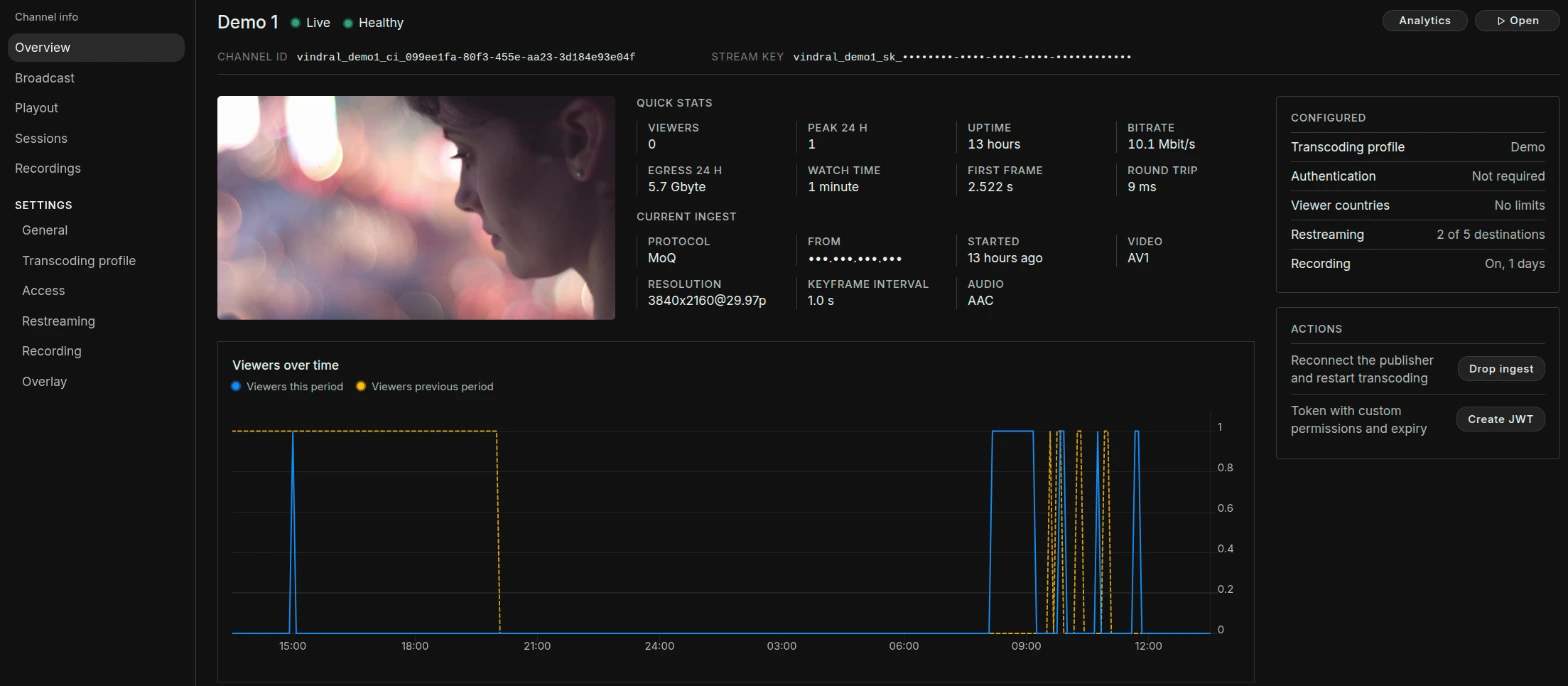
Channel pages in the Vindral Portal have a new layout. A sidebar lists Overview, Broadcast, Playout, Sessions and Recordings, with the channel’s settings below.

The Overview shows a live preview next to viewers, uptime, bitrate, egress, watch time, time to first frame and round trip time. Below that is the current or latest ingest: protocol, resolution, keyframe interval and codecs. A Configured panel sums up the transcoding profile, authentication, viewer countries, restreaming and recording.

The Overview page of a channel in the Vindral Portal, with a live preview, quick stats, current ingest and configuration

Read more about the Vindral Portal

Composer R3 2026 released

Composer R3 2026 “Zandvoort” adds multi-angle replay, the Matte Paint Keyer and frame-aligned SRT inputs for remote production.

Replay Recorder Targets record every camera angle to disk. Replay Channel plays any angle back from any timecode, live or from earlier in the session, with jog, step and shuttle. In the Replay window, operators mark in and out points and save named, tagged clips.

With the Matte Paint Keyer you paint the background colours in the preview, and protect the colours the key must never touch, such as skin or hair. Background Match and Light Wrap Mask help a keyed subject sit in its background, and the HSV Keyer gains edge softness, alpha gamma and edge recovery. Grading LUT now imports .cube files.

SRT input synchronization holds several genlocked remote cameras frame-aligned on their shared embedded timecode, even when the SRT links have different and changing latency. SRT, MoQ and RTMP (Multi scaler) targets can now encode HEVC with NVENC, and SRT targets can embed SMPTE timecode.

R3 also adds AES67 audio in and out, NDI 6 with up to 8 audio channels, an OCR operator and a Target Overview window. With a multilingual Whisper model, the Speech To Text operator writes live captions in 99 languages. For automated deployments, the Runtime gets health probes, an event stream, composer-cli and API keys with roles.

Read the full release notes here
Read the full announcement here

WebSDK – 4.6.0 released

We have released Vindral WebSDK 4.6.0, focused on background playback and clearer errors.

Playback can now continue when the viewer switches tab or app, or locks the phone. On phones, this depends on the browser and the decoder. The stream also shows in the operating system’s media controls, such as the Android media notification, the iPhone lock screen and Chrome’s media button. Both are on by default, and you can set the title and artwork that the controls show.

A new channel_not_live error code tells you that the player is waiting for an offline channel to go live. Before, this case was reported as failed_to_connect.

The release also fixes HEVC playback over WebSocket and mono Opus audio with MSE. MoQ playback now notices a lost connection after 5 seconds without data, down from 10.

Read more about background playback
Read full changelog here

New dashboard in the Vindral Portal

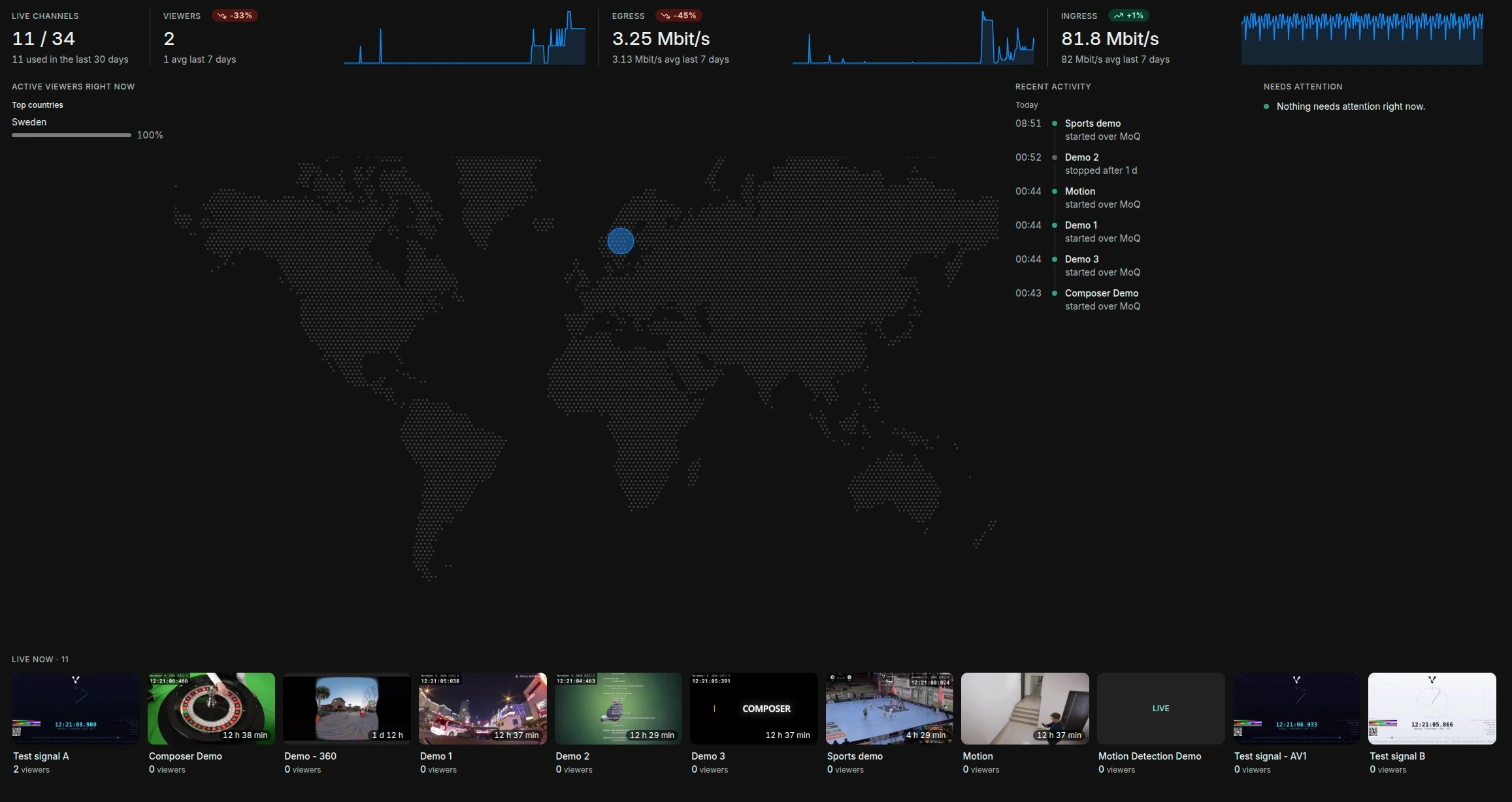
The dashboard in the Vindral Portal now shows what is live in your organization and what needs attention.

Along the top are live channels, current viewers, egress and ingress. Viewers, egress and ingress each show a graph of the last 24 hours, and how their average over the last 7 days compares with the 7 days before. A map shows where viewers are watching from right now. Live now shows live channels as cards with a thumbnail, how long each has been live and its current viewers.

Recent activity lists ingest starts and stops. Needs attention flags channels whose ingest has started three or more times in the last hour, or whose keyframes arrive more than 4 seconds apart. Both usually point to a problem with the encoder or its network.

The Vindral Portal dashboard with live channels, viewers, egress and ingress, a viewer map and live channel thumbnails

Read more about the dashboard

Redesigned analytics

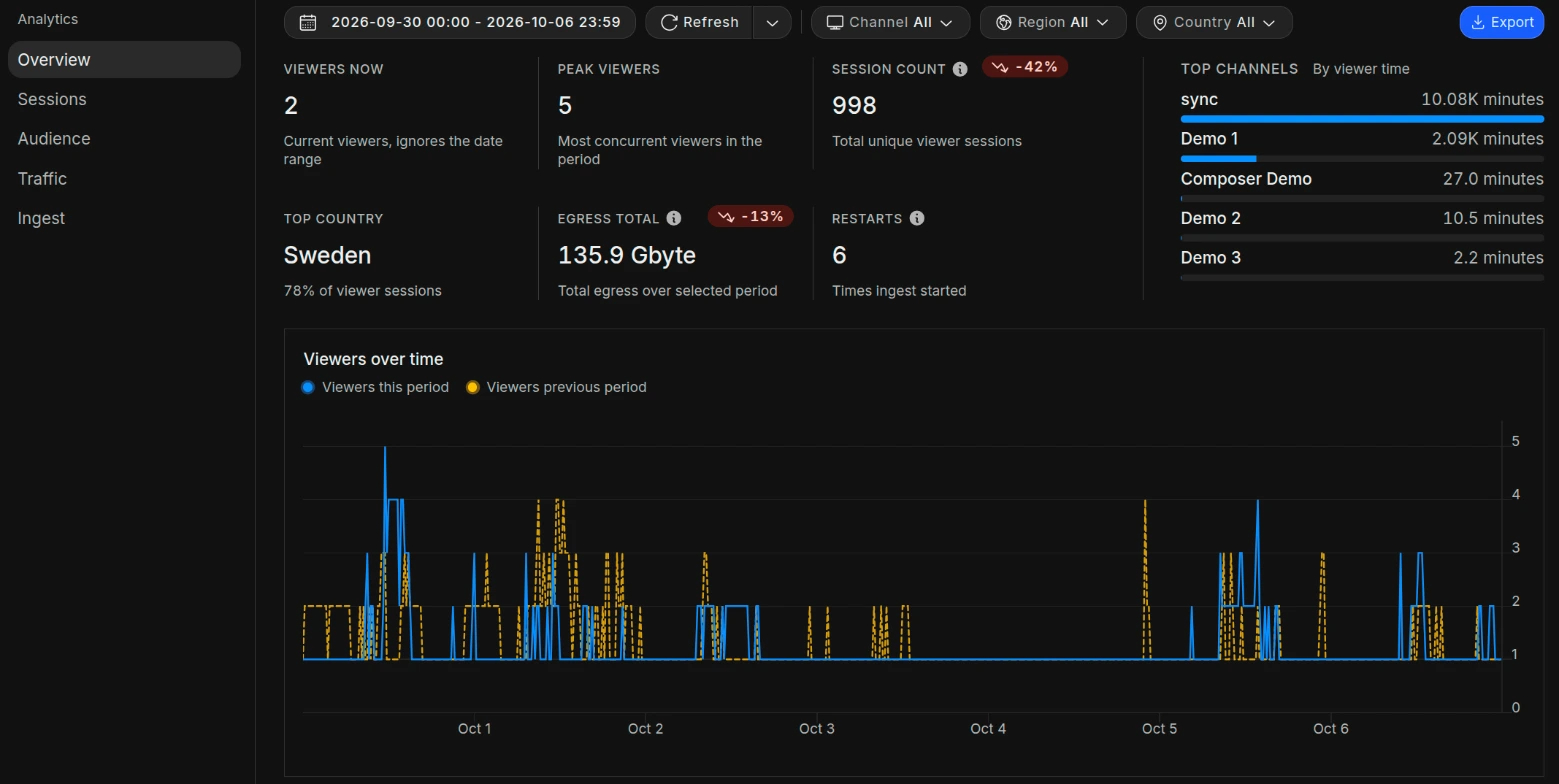
Analytics in the Vindral Portal has a new layout. Metrics are grouped into Overview, Sessions, Audience, Traffic and Ingest. Organizations with Hyperlocal Edge also get a Hyperlocal section.

The date range and the channel, region and country filters stay at the top of the page. You can now refresh the data by hand or on a timer, and drag across a graph to zoom in on a time range.

The Overview section of Analytics in the Vindral Portal, with viewer and traffic figures and a viewers over time graph

Read more about Analytics

Hyperlocal Edge status and self-service

Organizations with Hyperlocal Edge have a Hyperlocal section in Analytics. It now has a table with each hyperlocal edge’s status (Up, Down, Not reporting or Disabled), software version, certificate expiry, peak viewers and egress. Certificates that expire within 14 days are flagged. The section also shows viewer time, session duration and egress for your hyperlocal edges, and viewers over time per edge.

Administrators can now add, edit and remove hyperlocal edges and regenerate the hyperlocal API key in Settings, under Hyperlocal.

Read more about Hyperlocal Edge

Management API updates

The Management API has a new endpoint for monitoring ingest. GET /v1/status/ingest returns the current ingest of every channel in your organization that is receiving one: protocol, bitrate, keyframe and packet arrival deltas, and the tracks the encoder sends. You can filter by channel or channel group, and the values are at most 15 seconds old.

Deleting a channel with DELETE /v1/channels/{channelId} now also stops any ingest that is live on it.

Read the Management API reference here

WebSDK – 4.5.1 released

We have released Vindral WebSDK 4.5.1, focused on subtitle rendering.

Subtitle cues are now cleared when the playback clock resets, so only current cues stay on screen. Multi-line WebVTT subtitles also render correctly.

Read full changelog here

Apple SDK – 1.2.0 released

We have released Vindral Apple SDK 1.2.0 for iOS and tvOS.

Apps can now follow the network state and the client state through new callbacks, and Now Playing can show artwork. WebVTT subtitles render and time more accurately, a Picture in Picture crash and memory leak are fixed, and playback recovers better.

Earlier releases added WebVTT subtitles (1.1.1), AV1 hardware decoding on supported devices (1.0.12) and playback statistics through getStatistics() (1.0.11). Since 1.1.1 the SDK needs iOS 15 or tvOS 15.

Read full changelog here

WebSDK – 4.5.0 released

We have released Vindral WebSDK 4.5.0, focused on wider stream compatibility and more accurate seeking.

The Web SDK now supports playback of video streams that use B-frames. We have also improved the timeshift seek bar. At startup, the seekable range matches the media that is actually available, and it grows with broadcast time up to the advertised window.

Read full changelog here

WebSDK – 4.4.0 released

We have released several updates to the Vindral Player focused on improving usability, startup behavior, and playback reliability.

The biggest addition is timeline markers for the seek bar. Stream events such as “Race start”, “Goal”, or other key moments can now be marked directly on the timeline. Markers show labels on hover and nearby seeks snap magnetically to the event, making it easier for viewers to navigate to important moments.

We have also improved MoQ stream startup and synchronization. Timing information is now available earlier when starting a MoQ stream, reducing delays in initial synchronization and latency reporting.

Several playback fixes are included as well, including more accurate buffering detection, improved handling of client clock changes, restored Cast receiver defaults, better subtitle behavior on iOS and small screens, and fixes for audio track selection after reconnects or pause/resume.

Read full changelog here

Composer R2 2026 released

Composer R2 2026 brings animated overlays to V-Track Roulette, makes Extended Monitoring standard in every licence, and ships the most broadcast-focused feature list of any Composer release to date.

V-Track Roulette 2.0 adds animated overlays to the spinning wheel, built on the same tracking architecture as V-Track Money Wheel. Studios can now run motion graphics and dynamic branding frame-locked to the wheel without additional hardware.

Extended Monitoring moves from optional add-on to standard in every Composer licence. The full feature set is available from day one: centralised log management, 40+ live metrics per instance, and customisable alerts. Over 50 new telemetry metrics have been added across capture, render, encode, and output paths.

On the broadcast side: NDI Tally on input and output, 8-channel SDI audio via DeckLink, Panasonic PTZ control, and rebuilt signal-loss handling that reacts within frames. RTMP Multi Target lets a single instance push multiple quality levels in one operation. Rendering is up to 20% faster across the engine.

R2 also adds a self-hosted LLM input via Ollama. Any open-source language model running on the operator’s own hardware can generate live text for lower-thirds, tickers, and crawls. No prompts leave the network, no per-token fees.

Read the full release notes here
Read the full announcement here

WebSDK – 4.3.1 released

We have released Vindral WebSDK 4.3.0 and 4.3.1, focused on connection reliability, player behavior, and better observability.

The Web SDK now handles unstable network conditions more gracefully, with improved reconnect and fallback-edge behavior. We have also made drift correction more resilient for unstable input sources.

For the player, we added more control over fullscreen behavior and fixed an issue where hidden controls could still be clicked. This release also includes various other minor bug fixes and improvements.

Read full changelog here

WebSDK – 4.2.1 released

This release brings WebSDK updates (4.1.10–4.2.1) focused on lower latency, smoother playback, and improved stability.

Read full changelog here

MoQ ingest: broadcast from the browser

You can now go live on a Vindral Live channel straight from the browser over MoQ, with no encoder software or plugins.

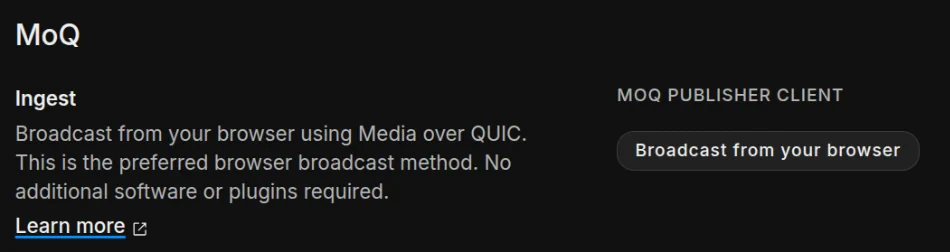
In the Vindral Portal, open Broadcast on a channel and choose Broadcast from your browser. This opens the hosted Vindral MoQ Publisher at publisher.vindral.com, ready to publish to that channel. The publisher shows browser capabilities and connection and media statistics, so you can test a setup before you go live.

The MoQ section of a channel's Broadcast page in the Vindral Portal, with the Broadcast from your browser button

To build your own broadcast page, use the @vindral/publisher SDK. It encodes in the browser with WebCodecs and publishes over MoQ, authorized with a signed token for the channel. Chrome is recommended.

MoQ ingest replaces WebRTC ingest, which is deprecated for new integrations.

Get started with MoQ ingest
Read the Publisher SDK API reference

Composer R1 2026 released

Composer R1 2026 “Daytona” brings professional broadcast audio processing, full SRT input and output support, and over 20 new GPU-accelerated video operators to Composer.

The release includes a complete integrated audio mixer with 8-channel routing, mix-minus submixes, EBU R128 loudness metering, and a full suite of dynamics processing, all controllable via the WebSocket API. SRT support covers both Listener and Caller modes with up to 16 channels of audio output and primary/backup path redundancy for reliable remote production.

New video operators span keying, compositing, image processing, and utility functions, including an HSV Keyer, Spill Suppression, Light Wrap, Gaussian Blur, and QR Code generation. The release also introduces Composite Layers, new target types, improved input management with search and filtering, autosave, and up to 10x faster HTML5 graphics rendering.

R1 2026 was proven at scale in Sveriges Television’s coverage of the 2026 Winter Olympics, where Composer handled 25 SRT signals in a full remote production environment.

Read the full release notes here

WebSDK – 4.1.9 released

We’ve rolled out a series of WebSDK updates (4.1.2–4.1.9) focused on faster startup, smarter quality adaptation, improved stability, and new player capabilities.

Read full changelog here

Domain rules

Domain rules let you decide which websites can play your streams. Use them to stop other sites from embedding your channels without permission.

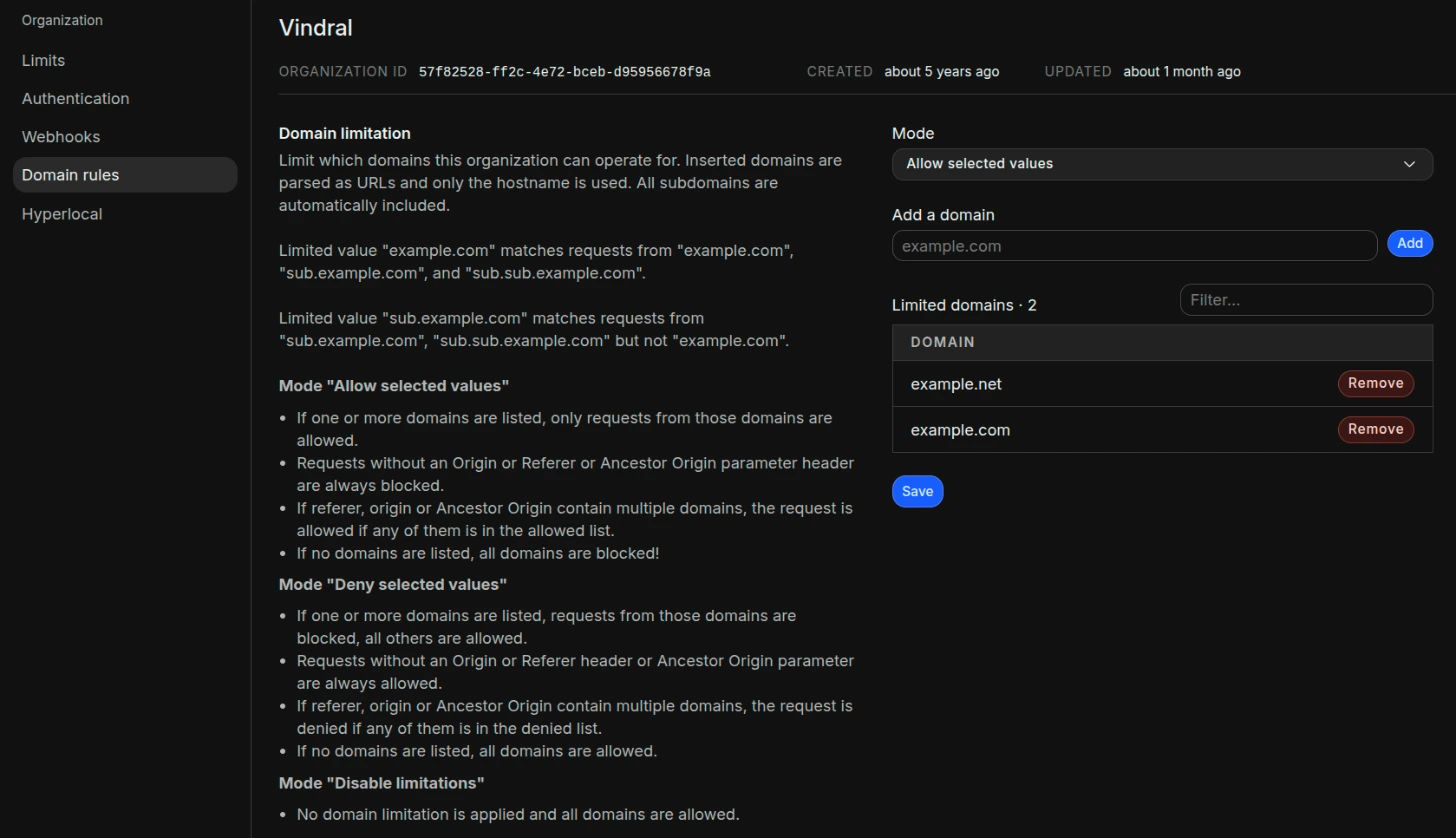
In the Vindral Portal, go to Settings and open Domain rules. Under Mode, choose Allow selected values to allow only the domains you list, or Deny selected values to block them. Then add the domains. In allow mode, requests without an Origin or Referer header are blocked. Subdomains are included automatically, and the rules apply to every channel in the organization. Organization administrators can change the rules, and other members can view them.

The Domain rules settings page in the Vindral Portal, allowing two domains

Ingest with signed tokens

Broadcasters can now publish to Vindral Live with a signed token (JWT) that expires, instead of the channel’s stream key. This works for RTMP and SRT ingest.

You sign the token with your organization’s auth secret, give it the ingest scope for a channel and set when it expires. The broadcaster then uses the channel ID together with the token. Each broadcaster can get a token of its own, and the stream key never has to leave your system.

Read more about authorizing ingest
See how to connect RTMP and SRT with a token

Composer R3 2025 released

Composer R3 “Autodrome” brings major updates to real-time video production, including a redesigned audio workflow with an integrated mixer and EBU R128 loudness metering, an expanded video switcher supporting up to 13 sources with a built-in multiviewer, and support for the AV1 codec offering up to 50% better compression than H.264.

The release also adds new format support for lossless HEVC, DNxHD, MXF, and QuickTime Animation RGB 4:4:4, NDI alpha channel support, and rendering speeds up to 400% faster. R3 further introduces V-Track, a new real-time tracking suite, with its first two products V-Track Roulette and V-Track Money Wheel.

Read the full release notes here

Composer R2 2025 released

The latest update to Composer introduces powerful new features and significant performance improvements across the board!

Highlights include Crystal Speech – an AI-powered noise reduction tool for clearer vocal audio – and support for ASIO input and output, enabling seamless integration with professional audio interfaces like Dante. We’ve also added a new Image Classification operator with support for Yolo models, along with Web Page Input upgrades that deliver up to 10x better performance and now include audio capture.

Other improvements include a new Point Tracker operator with auto-compensation for camera and set changes, an Automatic Gain operator for video, and major performance gains for the Video Delay operator when working with 4K+ resolutions.

DRM

Vindral Live offers stream protection tools like JWTs, geographical restrictions and ASN limitations to protect your content. While these are sufficient for most cases, sometimes additional measures are needed to prevent risks like screen recording and advanced browser plugins.

Vindral Live now introduces support for DRM (Digital Rights Management) in its security toolkit. Vindral Live’s DRM helps mitigate the impact of downloading tools, screen recording and screen sharing. Industry-leading protocols like Google Widevine, Microsoft PlayReady and Apple FairPlay are utilized — the same technologies trusted by the likes of Disney and Netflix. Current support includes EZDRM and Irdeto.

Read more about DRM in the Vindral Live documentation.

Contact us to learn how DRM can enhance your content security on Vindral Live.

Composer R1 2025 released

The latest update to Composer introduces powerful AI features, including an Object Detection operator and a Speech-to-Text tool powered by OpenAI’s Whisper. We’ve also added new Audio Operators with filters like equalizers, delay, and more. Performance improvements include enhanced DeckLink input and a new undo feature (CTRL+Z). Additionally, GUI updates, monitoring enhancements, and new tutorials are included to help you get the most out of the new capabilities.

Multiviewer

Introducing the Vindral LiveCloud Multiviewer—a tool for viewing multiple Vindral channels simultaneously. Its primary purpose is to provide channel managers with an easy and accessible overview of multiple channels.

WebSDK 4.0.0 Introduces New Web Player

With our recent release of WebSDK version 4.0.0, we introduce our new web component-based player.

This player features an updated design and comes with built-in controls for a seamless viewing experience. It is highly customizable and easy to integrate into your web applications.

Analytics ingest stability

We have added fresh metrics to the analytics page in the portal, a new tab with information regarding stability of the ingested media. The following set of metrics is now available for viewing:

Restarts

Total times ingest has started over the selected time period. This includes controlled restarts.

Restarts cause buffering for the end users, so for a stream running 24/7 this number should be as low as possible.

Video Key frame interval

We recommend a value of one or two seconds for faster channel switching and startup time, lower value is preferred. Here you can check that you are ingesting with an optimal key frame interval.

Average packet arrival delta

How often we receive a packet containing media from your sender.

Ideal value for video is 1000/frame rate, which gives a delta of 20ms for 50 fps and 33.3ms for 30 fps. This value should be stable and pretty close to the ideal value, a value that is much higher than the ideal value or varies a lot suggests there may be problems with the network.

Highest packet arrival delta

This value will vary a little bit more. Any peaks or consistently high values above the ideal indicate networking issues or host machine congestion.

Composer R2 2024 released

The R2 2024 release brings major updates to Composer, including a brand new scripting engine, new operators, outputs and input types. The release brings improvements to the chroma keyer and media management features. The release also contains a long list of performance improvements and bug fixes.

WebSDK – 3.3.4 released

This release contains improvements to the embeddable player, enhanced compatibility with older devices and various bugfixes.

Clipping

Vindral now includes a tool for clipping recorded live streams. After enabling recording on your channel, you can use our API to create clips of your live stream for embedding or downloading.

Hyperlocal Edge

Hyperlocal Edge is a solution designed to optimize network performance during events or similar situations. It provides edge egress on a local network for your channels, thereby helping to avoid saturating the public network. This ensures smooth streaming and reduces latency, enhancing the user experience.

Recording

Vindral portal now has support viewing your recordings. Navigate to the Recordings tab on a channel where recording is enabled. This page contains:

  • Information about your channel’s recordings
  • A player for viewing recordings
  • Input fields choosing the time range of the recordings you want to view
  • Buttons for downloading recordings from selected time window

View recordings documentation

Player link builder

We have gathered some links and code snippets to make it easy for you to integrate and test your channels, navigate to the Playout tab under the channel details in the Vindral portal to find the links and code snippets.

With the Player link builder you can build a customized link with a few player options and an authentication token that is valid for a specific time period.

Player link builder documentation

Analytics in Management API

The Mangement API has been updated with new endpoints for getting status and analytics data for all channels in your organization.

Check out the new endpoints in the Management API documentation.

Improved search

We have made it easier to find information and configure Vindral by introducing a powerful new search for all documentation pages.

SRT general availability

Our SRT (Secure Reliable Transport) integration is now available, offering support for multiple audio tracks and advanced codecs like AV1 and Opus. Previously in closed access within Vindral for many months, it’s now fully accessible.

For details on activating SRT for your streams, visit the Broadcast tab on your channel.

Composer R1 2024 Released

The R1 2024 release brings major updates to Composer, including improved workflow, new components, improved chroma keyers, support for ProRes files (including 4:4:4), and more. We have also added downloadable Tutorials and Demos that might become valuable when evaluating Composer or learning about new features.

Webhooks

We’re excited to announce that Webhooks are now in General Availability! This feature allows you to receive real-time callbacks when your channels transition between online and offline statuses. This update is designed to streamline your workflow and keep you informed of your channels’ activity with greater immediacy.

Restreaming

Restreaming is a powerful tool for simultaneously sharing your live broadcasts across multiple channels like YouTube, Twitch, and Facebook.

Achieve widespread coverage without the complexity of managing multiple encoders on-site.

WebSDK – 3.2.0 released

Version 3.2.0 brings support for Managed Media Source. This will enable greater quality and performance on iPhone devices with iOS 17.1 and newer, bringing them on par with other devices.